Showing posts with label tronsmart. Show all posts
Wednesday, 16 July 2014
New EZCast Firmware v12128 on Tronsmart T1000
I don't have yet a change log for version 12128, please see below the change log for the previous version.
EZCast Firmware v12127 update note
1. Rearrange the wifi list to show the most frequent use and strongest signal AP router first.
2. Refine the EZCast user interface
3. Update the top-right indicator of WiFi signal strenght regularly and turn the icon to red if the signal is too weak.
4. Modify Miracast exit mode.
5. Fix some Airplay video playback issues.
6. Fix some DLNA video playback issues.
7. Fix someM3U8 issues for DLNA and live streaming playing.
8. Improve stability of Miracast connection.
Tuesday, 8 July 2014
EZCast for Android reaches 1.1.328 version. See what's new!
Android v1.1.328 update note
1. Redesign Dropbox UI
2. Add music playlist
3. Provide option to choose YouTube lower quality video
4. Fix: web/cloud video performance issue in China
It looks like today the EZCast firmware gets a new update, but my Tronsmart T1000 dongle didn't received it yet via OTA.
EZCast Firmware v12127 update note
1. Rearrange the wifi list to show the most frequent use and strongest signal AP router first.
2. Refine the EZCast user interface
3. Update the top-right indicator of WiFi signal strenght regularly and turn the icon to red if the signal is too weak.
4. Modify Miracast exit mode.
5. Fix some Airplay video playback issues.
6. Fix some DLNA video playback issues.
7. Fix someM3U8 issues for DLNA and live streaming playing.
8. Improve stability of Miracast connection.
Download Windows EZCast latest portable version 1.0.0.146, released yesterday, 2014-07-07, from here, here or here. EZCast displays your Windows embedded PC and Notebook wirelessly via EZCast devices or platforms.
Requirements
Windows XP SP3, Windows Vista, Windows 7, Windows 8/8.1.
Supports Mirror (XP/Vista/7/8/8.1) with audio transmission (Vista/7/8/8.1).
Supports music and video streaming.
Do not support Windows starter version.
Everything you want to know about EZCast previous versions you'll find here.
Friday, 13 June 2014
Tronsmart T1000 new OTA Update v.11963
Tronsmart T1000 gets a big new update. Just go to 'Settings' and click update button to install the OTA update v.11963.
What's new:
1. Improve subtitle discovery protocol.
2. Fix EZMirror Boot Mode issue.
1. Improve subtitle discovery protocol.
2. Fix EZMirror Boot Mode issue.
3. Improve Wifi module detection for robust SSID generation.
4. Improve miracast for windows 8.1 new update (PBC mode).
5. Improve DLNA support for some apps (filmon, DS Video)
6. Resolve the issue for free space wifi selection.
7. Add languages: Arabic, Greek, Portuguese, Turkish, and Indonesian.
8. Fix minor bugs.
Tuesday, 10 June 2014
Ezcast Application running on Nokia Lumia 520 with Windows 8.1
Tronsmart T1000 Miracast dongle can now support Windows Phone, which is a great thing. You can download the EZCast application free from Windows Store or from here.
EZCast devices, in the forms of dongles or boxes, are the remote-free cross-platform (iOS, Android, Windows, Mac and Windows phone 8.1) wireless display products, which receive and display the contents you love from internet and your own portable devices (smartphones, tablets, notebook and Mac).
EZCast APP for Windows phone, developed by WinnerWave, displays documents and multimedia from Internet or your Pads/Smartphones wirelessly in cooperation with EZCast devices.
Supports:
Local photo display, Local Music/Video Streaming
Web browsing and Internet Video Streaming
DLNA as a render (DMR)
Miracast mirroring
EZCast devices, in the forms of dongles or boxes, are the remote-free cross-platform (iOS, Android, Windows, Mac and Windows phone 8.1) wireless display products, which receive and display the contents you love from internet and your own portable devices (smartphones, tablets, notebook and Mac).
EZCast APP for Windows phone, developed by WinnerWave, displays documents and multimedia from Internet or your Pads/Smartphones wirelessly in cooperation with EZCast devices.
Supports:
Local photo display, Local Music/Video Streaming
Web browsing and Internet Video Streaming
DLNA as a render (DMR)
Miracast mirroring
Saturday, 26 April 2014
WiFi Display from E-ceros Vision tablet to EZCast & EZMirror on Tronsmart T1000
Hello guys.
In this video I'll show you how to use Wifi Display function on E-ceros Vision tablet powered by Android Jelly Bean 4.2.2. For this I choose to use EZCast Android application together with a Tronsmart T1000 EZcast dongle connected to my TV. I was helped by a fly mouse and mini keyboard combo model RKM MK704.
Enjoy your watching!
Sunday, 13 April 2014
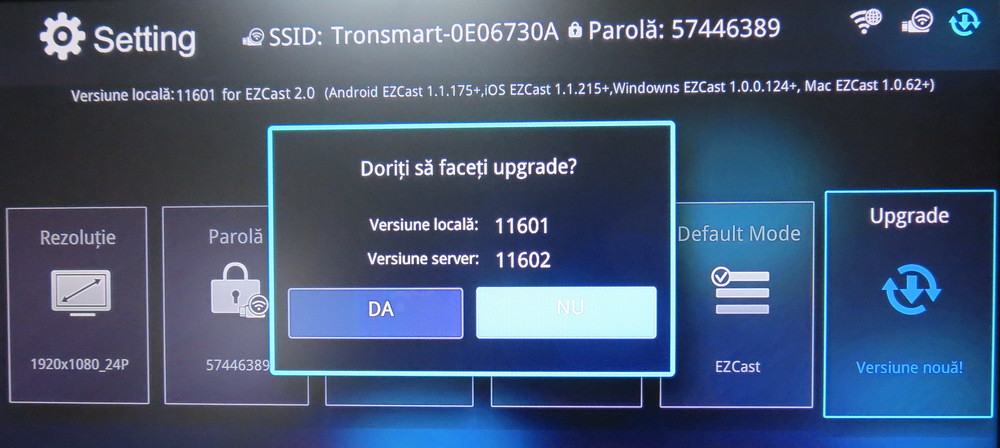
EZCast OTA 11602 firmware upgrade on Tronsmart T1000
To manually upgrade EZCast firmware on Tronsmart T1000 to 11468 version read this article. Download the latest version of EZCast applications from here.
Sunday, 6 April 2014
EZCast OTA 11601 firmware upgrade on Tronsmart T1000
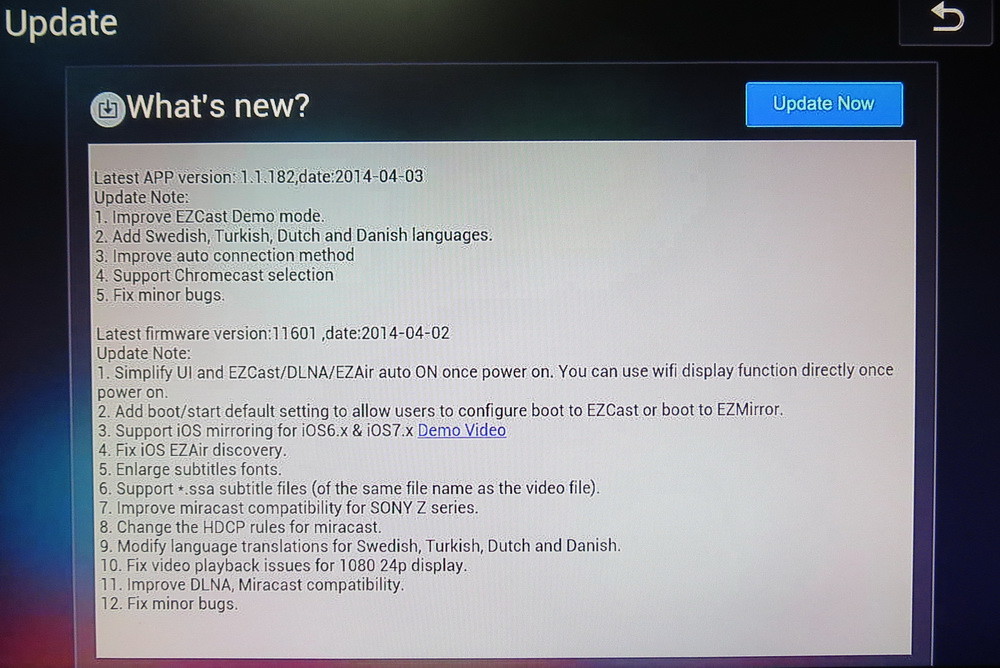
What's New in EZCast firmware version 11601 (2014-04-02)
1. Simplify UI and EZCast / DLNA/ EZAir auto on once power on. You can use wifi display fubction directly once power on.
2. Add boot / start default setting to allow users to configure boot to EZCast or boot to EZMirror.
3. Support iOS mirroring for iOS6.x & iOS7.x.
4. FixiOS EZAir discovery.
5. Enlarge subtitles fonts.
6. Support *.ssa subtitle files (of the same file name as video file)
7. Improve Miracast compatibility for Sony Z series.
8. Change the HDCP rules for Miracast.
9. Modify language translations for Swedish, Turkish, Dutch and Danish.
10. Fix video playback issues for 1080 24p display.
11. Improve DLNA & Miracast compatibility.
12. Fix minor bugs.
12. Fix minor bugs.
13. A new tab in Setting --> 'Default Mode' (see the pictures below)
To manually upgrade EZCast firmware on Tronsmart T1000 to 11468 version read this article. Download the latest version of EZCast applications from here.
The Android application also upgraded from 1.1.159 to 1.1.182 version (2014-04-03)
What's New in EZCast Android version 1.1.182 (2014-04-03)
1. Improve EZCast Demo Mode.
2. Add Swedish, Turkish, Dutch and Danish languages.
3. Improve Auto Conection method.
4. Support Chromecast selection.
5. Fix minor bugs.
EZCast APP for Android version, developed by WinnerWave, displays and exchange your multimedia from your Android embedded smartphone and pad wirelessly via EZCast devices or platforms.
Requirements: Android 4.0 above (1GHz+ CPU and 1GB+ DDR are preferred). Supports photo display, document presentation, web browsing, camera mirroring, music and video streaming.
Thursday, 6 March 2014
Download Tronsmart T1000 Firmware v. 11468
Download Tronsmart T1000 new firmware version 11468 from here, here or here. Read this article to see exactly how to manually upgrade firmware for Tronsmart T1000. Here you'll find the latest versions of EZCast applications.
What's New in EZCast firmware version 11468 (2014-02-28)
1. Fix bugs for subtitle streaming
2. Improve video transmission performance.
3. Improve .asf and .flv video support.
4. Improve Miracast compatibility.
5. Improve Audio decoding.
6. Simplify UI, improve OSD.
7. Remove split screen. (Split screen is only for premium version with larger internal memory).
8. Improve OTA rules. (It is noted that this update will reset the configuration default).
9. Add 'Social Network' function.
10. Fix minor bugs.
1. Fix bugs for subtitle streaming
2. Improve video transmission performance.
3. Improve .asf and .flv video support.
4. Improve Miracast compatibility.
5. Improve Audio decoding.
6. Simplify UI, improve OSD.
7. Remove split screen. (Split screen is only for premium version with larger internal memory).
8. Improve OTA rules. (It is noted that this update will reset the configuration default).
9. Add 'Social Network' function.
10. Fix minor bugs.
Monday, 3 March 2014
How to manually upgrade firmware for Tronsmart T1000
Download firmware and flash tool from here or from here. The archive contains 2 firmware versions: T1000 11281 firmware & T1000 11283 firmware, also the flash tool ActionsMPUpdate_v1.14. The current version of EZCast firmware is 11468.
Please note, usually you don’t need to use upgrade firmware manually, because Tronsmart T1000 supports OTA upgrade, Tronsmart will push the newest firmware to your device via OTA technology. This instruction is just used when you can’t get upgrade from OTA, and we also release this upgrade method and firmware to the developers, and hope we can see some custom roms or new features coming soon.
Upgrade instructions
Step 1 You should prepare your Tronsmart T1000 and one micro usb cable, (the one you always used to charge your smartphone, please don’t use the usb cable included in the package), and you also need tweezers (or thumb pin)
Step 2 Open the case of Tronsmart T1000.
Step 3 Short Flash Pin. One hand shorts the pin 5 and pin 6 as shown on the picture below, then another hand puts the usb plug into the PC.
Step 4 The computer will popup message window and ask you to install driver for Actions USB Device. Notice:there’s no need to short pins any more if you get this message.
Choose “install from a list of specific locations” and then you get this window:
Now you should click Browser button and go to find the usb drivers, the drivers is in the download file, after you download the upgradetool file, decompress it, and you will find a floder called “adfu_driver”, choose this folder, and then click Next. If you met the following menu, just click” continue anyway”
Step 5 After you successfully install the drivers, you can go to flash the firmware, Go to the “upgradetool” folder, and run ActionsMPUpdate.exe.you will see this window
Click the “Firmware” button and select firmware file you just downloaded ( the firmware should be in .bin formate). After load the firmware, click Download and wait for the process to complete.
If you see this text, it means you have flashed it successfully.
Friday, 14 February 2014
Tronsmart Vega S89, the first Amlogic S802 Android TV Box
Highlights
The Most Powerful Android TV BOX
CPU: Amlogic S802 Cortex-A9 Quad Core Up to 2.0Ghz
GPU: Mali-450
OS: Android 4.4 Kit Kat with OTA support
Support Dual Band Wifi module (2.4Ghz/5Ghz)
Miracast/DLNA support
Specifications
Accessories
HDMI Cable
USB Data Cable
Manual
USB Cable
Adapter
Manufacturer website - www.tronsmart.com
Saturday, 25 January 2014
Tronsmart T1000. Versatile, intuitive, powerful
Hello everybody!
Our team just received these days the Tronsmart T1000 Mirror2TV dongle. The Tronsmart T1000 Mirror2TV is a tiny adapter that you can plug into a TV or monitor via HDMI to turn it into a wireless display for your phone, tablet, PC, or other devices. As you can see next, this gadget is in fact very powerful and versatile.
The little device looks a bit like a USB flash drive, and it’s small enough to fit in the palm of your hand. But after you plug it into a display and connect the USB WiFi and power adapter, you can use it to mirror your phone, tablet, or PC display on a big screen or use your display as a second screen for your notebook or tablet.
You have to install EZCast application on your device in order to connect with Tronsmart T1000. EZCast supports almost all platforms: Windows, Android, iOs & MacOS. You can download EZCast for you platform from the official website or directly from our article. You can also use the EZCast app to stream video, music, photos, or other content without using Miracast.
1. Tronsmart T1000 unboxing. In this video you'll see the unboxing. The pack contains: packaging box, Tronsmart T1000 device, English User Manual and USB / Wifi module cable.
You have to install EZCast application on your device in order to connect with Tronsmart T1000. EZCast supports almost all platforms: Windows, Android, iOs & MacOS. You can download EZCast for you platform from the official website or directly from our article. You can also use the EZCast app to stream video, music, photos, or other content without using Miracast.
1. Tronsmart T1000 unboxing. In this video you'll see the unboxing. The pack contains: packaging box, Tronsmart T1000 device, English User Manual and USB / Wifi module cable.
2. Tronsmart T1000 OTA Firmware upgrade. Tronsmart T1000 works like a charm just out of the box. In the next video I used it paired with a Huawei Ascend G300 smartphone, with Android CM11 KitKat 4.4.2 firmware. Tronsmart T1000 came with 11164 firmware version; I upgraded it easily to 11281 version. After the reboot the system found and install yet a newer version 11283.
3. T1000 paired with Acer Icoania A1-810 Android Belly Bean 4.2.2 Tablet. After Huawei Asscend G300 smartphone, I managed to pair with no problem at all another Android device: my Acer Iconia A1-810 Android Belly Bean 4.2.2 Tablet, bellow is the video.
4. Tronsmart T1000 paired with HP Slate 2 Win 8.1 Tablet. I changed the platform and Tronsmart T1000 had performed very good as well. I mirrored my HP Slate 2 Win 8.1 Tablet and now I like T1000 even more. To do that first I had to update the driver for Atheros AR6003 802.11a/b/b/n Wifi Adapter from 3.1.2.85 to 3.1.2.89 version, via Windows Online Driver Update.
5. Tronsmart T1000 paired with Win 8.1 AIO PC. As you can see in the next video, T1000 connected and mirrored simply and easily my Win8.1 AIO PC.
If you need more help for setting up the device and EZCast software, please visit the official Support Page. Here you'll find the EZCast User Manual for all the platforms.
--------------------------------------------------
Bottom Line
The price of Tronsmart T1000 is now only USD 29.99 on www.geekbuying.com. For that little price the Tronsmart T1000 provides many options and do great things connecting your smart devices to your bigger TV screen without any wires. In these days this little piece of technology seems to be a must in our homes. If you have a regular LCD, LED or plasma TV, and you want to turn it into a powerfull smart TV, I guess this is the most cheap and practical solution. I like it much enough already, but the choice is now yours. Cheers!
Saturday, 18 January 2014
Thursday, 7 March 2013
Tronsmart Prometheus Android TV Box
Overview
Tronsmart Prometheus is the unique designed dual core TV Box in market which support XBMC 1080P hardware decoding.
Highlights
Android 4.1.2 OS, Google Play Store pre-installed;(will upgrade to android 4.2 soon)
Amlogic-M6 Dual Core CPU, max 1.5Ghz
Support full hardware decoding;
Build in 3 USB port, can connect with USB wireless keyboard/mouse, USB HDD etc;
Build in RJ45 port, support Ethernet;
Build in AV port, can connect with your TV via AV Port;
Build in Power on / off button;
Wifi can reach 150Mbps, and no drops;
Support usb camera
Specification
CPU: Amlogic-8726M6 Cortex A9 CPU Max.1.5GHz
GPU: Integrated Mali-400 GPU(3D Acceleration Engine)
RAM: DDR3-1G
Storage: NAND Flash 4GB
OS: Android 4.1.2
Wi-Fi: build in wifi module, 802.11b/g/n
Video: MPEG-2, H.264,MPEG-4,VC-1 at 1080P
Audio: MP3, WMA, OGG, WAVE,…
Multi Language: Support Multi language
USB: 3 x USB 2.0 HS(outside); 2 x USB 2.0HS(inside)
SD card slot: 1 x SD/MMC/MS memory card slot
RJ45: Wire Ethernet connection
HDMI output: HDMI output 1.3 version; can support 1.4version HDMI cable
AV output: YES. Support old CRT TV SET
Accessories: Power Adaptor, User Manual & Mini HDMI Cable
GPU: Integrated Mali-400 GPU(3D Acceleration Engine)
RAM: DDR3-1G
Storage: NAND Flash 4GB
OS: Android 4.1.2
Wi-Fi: build in wifi module, 802.11b/g/n
Video: MPEG-2, H.264,MPEG-4,VC-1 at 1080P
Audio: MP3, WMA, OGG, WAVE,…
Multi Language: Support Multi language
USB: 3 x USB 2.0 HS(outside); 2 x USB 2.0HS(inside)
SD card slot: 1 x SD/MMC/MS memory card slot
RJ45: Wire Ethernet connection
HDMI output: HDMI output 1.3 version; can support 1.4version HDMI cable
AV output: YES. Support old CRT TV SET
Accessories: Power Adaptor, User Manual & Mini HDMI Cable
Manufacturer website - www.tronsmart.com
Subscribe to:
Posts (Atom)


.jpg)