Showing posts with label download. Show all posts

Friday, 8 August 2014

EZCast applications latest versions (8 August 2014)


EZCast is powerful Wi-fi Display application, you can use EZCast to transfer easily and quickly photos, music and videos from smart phones, tablet PC, notebook computers or desktop computers to the TV, monitor or projector.


What's new in Android EZCast v.1.1.412 version (2014-08-07)
1. add game (liar's dice).
2. add app push notification.
3. support casting to Ezcast music dongle.

4. add UI to report web video site which fails to playback
5. support HQ/LQ switch in cloud video


My Tronsmart T1000 just upgraded today Ezcast firmware to 12128 version. It looks like that soon it will get the new 12332 version.

What's new in EZCast firmware v. 12332 version (2014-08-07)
1. Fix Spanish displaying error issue.
2. Add show page number for WiFi list.
3. Fix Youtube seek issue.
4. Fix music logo abnormal issue.
5. Speed up OTA.
6. Increase boot music volume.

7. Improve Airplay stability.
8. Optimize A/V synchronization.
9. Fix LG G2 miracast connection issue.
10. Refine user interface.   
11. Fix some WAV files playback issue.
12. Improve WiFi stability when there is no external WiFi AP.
13. Support 192K sample rate music.
14. Support 24bits, 32bits WAV music.


What's new in Windows PC EZCast v.1.1.0.79 version (2014-08-07)
1. add web, cloud video, live tv functions.
2. Add comment function.


Here you can download the previous versions pack.
Tronsmart T1000 is an amazing Mirror2TV dongle.

Download Amlogic S802 USB_Burning_Tool V2.0.0.140211


Download Amlogic S802 USB_Burning_Tool  V2.0.0.140211 from here, here or here.

Archive content:
- usb刷机工具操作指南.pdf
- setup_v2.0.0.140211_Alpha_x86.exe

Download Android stock firmware for MK808B Mini TV


Download Android stock firmware for MK808B TV Dongle from here or from here.

 
Firmware: update_mk808b_v5.0_104j2103.rar
Archive file size: 235 MB 
Platform: RK3066
Boot version: 2.13
FW version: 4.2.02


Download Android stock firmware for MK918 TV Box


Download Android stock firmware for MK918 TV Box from here or from here.

 
Firmware:update_mk918_207j2106_overseas_8723bs.rar
Archive file size: 370 MB 
Platform: RK3188

Download Android Jelly Bean 4.2.2 stock firmware for EM6 / HD18D / MX42 TV Boxes


Download Android Jelly Bean 4.2.2 stock firmware for EM6 / HD18D / MX42 TV Boxes from here or from here.

 
Firmware:Em6-hd18d_mx42_20130801px1_20131122n.rar
Archive file size: 366 MB 
OS: Android Jelly Bean JDQ39
Model: MBX reference board (g18ref)
Platform: Amlogic

Thursday, 7 August 2014

Download Android stock firmware for Umi X3 Smartphone


Download Android stock firmware for Umi XIII Smartphone from here or from here.

 
Firmware:UMI_X3__mt92_s5_s5umi_ltj_wcdma_jb9_ldata_tphone_20140606-201947 
Archive file size: 411 MB
Platform: MTK6592
Project: vanzo92_wet_jb9
Config_version: V1.1.2

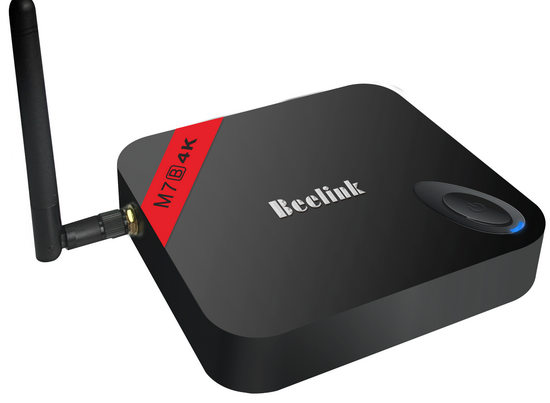
Download Android stock firmware for Beelink M7B TV Box


Download Android stock firmware for Beelink M7B TV Box from here, here or from here.You can download the firmware for M7B 1G/8G model from here.

 
Firmware:M7B_108k4_beelink.rar  
Archive file size: 361 MB
Model:M7B 2G/8G  
base:M7B_107k4
Date:2014.08.02
Platform: Amlogic S802B
Image file name: M7B_108k4_beelink.img


What's new:
1.Add 1080P24Hz support;
2.Support for NTFS/CIFS; --Offered by wasser
3.Change Input method to Latin,and remote can use;
4.Update Play Store;
5.Support for Mele F10 air-mouse; --Pulled from Bob's FW
6.Support for Xbox/PS3; --Offered by Bob
7.Change method of Root access; --Offered by leolas
8.Add kill-recent-task function; --Offered by daemonium
9.Update xbmc to Gotham 13.1,fix 4k playback and 2160P/720P HDMI display issue; --THX stane
10.Add remote function in Recovery Mode;--THX leolas
11.Adjust MBXLauncher,add Yahoo wether and Clean-Memory function,fix slow animation issue;
12.Fix issue->Power-key of Remote might lead to reboot;
13.Improve small probable of blurred screen 


Download Nexus Root Toolkit 1.8.6


First of all just download Nexus Root Toolkit 1.8.6 from here, here or here. You can downlod previous version Nexus Root Toolkit 1.8.5 from here.


Unlocking, rooting, relocking and unrooting simplified! (and much more!)


VERSION 1.8.5  - This program will automatically bring together all the files you need to unlock and root your device in a few clicks, or flash it back to stock and re-lock it. You can also use this program to backup/restore all your important data, flash zips, set file permissions, push and pull files, install apps, generate logcats/bugreports, and much more! With the included file association options, you can perform tasks like flashing zips, installing apps, restoring android backup files, and flashing/booting img files with just a double click! The program includes a full featured interface for automating tasks in TWRP, enhanced restore features, an in-built auto-updater/notification system, ‘any build’ mode, advanced restore features,’NRT- Live Log’ for viewing the adb/fastboot cmds that are run in the background, quick tools utilities, and tools for taking screenshots/screen-recordings.   All the latest Android builds and Nexus devices are officially supported including the new Nexus 5, with full KitKat support for all the newly upgraded devices.  The program intelligently and selectively downloads the files it needs for your device and makes sure you are using the latest files available.  The program can even auto-detect your device and build.  The main changes in this release are full 4.4.4 support, improvements to the updater, and general code enhancements and optimizations.


Supported Nexus devices:
· Galaxy Nexus: GSM Models (both yakju and non-yakju builds)
· Galaxy Nexus: CDMA/LTE Verizon Models
· Galaxy Nexus: CDMA/LTE Sprint Models
· Nexus S: Worldwide, i9020t and i9023 Models
· Nexus S: 850MHz, i9020a Models
· Nexus S: Korea, m200 Models
· Nexus S 4G: d720 Models
· Nexus 7: Asus Tablet
· Nexus 7 3G: Asus Tablet
· Nexus 7 v2 (2013): Asus Tablet
· Nexus 7 v2 (2013) LTE: Asus Tablet
· Nexus 10: Samsung Tablet
· Nexus 4: LG Phone
· Nexus 5: LG Phone

Instructions:
1. Select the correct device and build (what you are currently running)
2. Configure your drivers if you haven’t already using the driver guide (If you aren’t sure use Step 3 of the driver guide to test your drivers).
3. If you need to, backup your important data.
4. Unlock your device
5. Root your device
6. Enjoy! ^_^
  • Learn more about each option by mousing over the control, dynamic tooltips will provide you more information, also each button displays a message about what it does first.
  • So the best way to get familiar with the toolkit is simply to press the buttons and read what it says.
What’s new in Nexus Root Toolkit 1.8.6: August 6th, 2014
· Fixed linking to external websites from NRT’s main menu on Windows 8.1.
· Additional file dependency checks for the Lock script, to ensure it runs properly for N4 devices.
· Fixes to the custom driver installer to ensure it runs properly on machines that don’t have English set as the default language.
· New ‘Busybox’ option in the toolkits main settings menu for selecting whether or not the user wants to skip its installation during the root procedure, flash the free version (default), or install Busybox pro from the Playstore.
· Other small bug fixes and optimizations.

Download Android KitKat 4.4.2 stock firmware for Nagrace HPH NT-N3 TV Box


Download Android KitKat 4.4.2 stock firmware for Nagrace HPH NT-N3 TV Box  from here or from here.

 
Firmware: RK30SDK_RK3066_RK3066_4.4.2_V1.0.0_140619.rar
Model: HPH NT-N3
Image file size: 251 MB 

Wednesday, 6 August 2014

Download Android KitKat 4.4.2 stock firmware for Nagrace HPH NT-V3 TV Box


Download Android KitKat 4.4.2 stock firmware for Nagrace HPH NT-V3 TV Box  from here, here or from here.

 
Firmware: TRV3_RK3188_Android4.4.2_20140530
Model: HPH NT-V3
Image file size: 282 MB 

Download Android KitKat 4.4.2 stock firmware for Nagrace HPH NT-V5 TV Box


Download Android KitKat 4.4.2 stock firmware for Nagrace HPH NT-V5 TV Box  from here or from here.

 
Firmware: TRV5_RK3188_Android4.4.2_20140530
Model: HPH NT-V5
Image file size: 282 MB 

Download Android stock firmware for Beelink M7B TV Box


Download Android stock firmware for Beelink M7B TV Box from here or from here.You can download the firmware for M7B 2G/8G model from here.

 
Firmware:M7B_108k4_1gddr_rtl8188  
Model:M7B 1G/8G  
base:M7B_107k4_1gddr_rtl8188
Date:2014.08.02
Platform: Amlogic S802B
Image file name: M7B_108k4_1gddr_rtl8188_beelink.img
Image file size: 614 MB 

What's new:
1.Add 1080P24Hz support;
2.Support for NTFS/CIFS; --Offered by wasser
3.Change Input method to Latin,and remote can use;
4.Update Play Store;
5.Support for Mele F10 air-mouse; --Pulled from Bob's FW
6.Support for Xbox/PS3; --Offered by Bob
7.Change method of Root access; --Offered by leolas
8.Add kill-recent-task function; --Offered by daemonium
9.Update xbmc to Gotham 13.1,fix 4k playback and 2160P/720P HDMI display issue; --THX stane
10.Add remote function in Recovery Mode;--THX leolas
11.Adjust MBXLauncher,add Yahoo wether and Clean-Memory function,fix slow animation issue;
12.Fix issue->Power-key of Remote might lead to reboot;
13.Improve small probable of blurred screen 


Monday, 4 August 2014

Download Eweat EW802 Android KitKat 4.4 stock firmware


Download Eweat EW802 Android KitKat 4.4 stock firmware  from here or from here.


Archive name: eweat_ew802_20140728
Archive file size: 365 MB
Build: k200-user 4.4.2 KOT49H 20140726 test-keys

Platform: Amlogic

Download ZOPO ZP998 Android 4.4 Kitkat stock firmware


Download ZOPO ZP998 Android 4.4 Kitkat stock firmware here or from here.


Archive name: ZP998-20140704-100917Android 4.4
Archive file size: 365 MB
Project: vanzo92_cwet_kk

Platform: MT6592
Config_version: V1.1.2


Upgrading notes (see this video tutorial)
1 – Download & unpack FlashTools. Run Flash_tool.exe
2 – Unpack Rom in folder
3 – Select MT6582_Android_scatter.txt in folder on rom. And wait.
4 – Check Option->USB Model, click USB Model
     Choose Option->DA DownLoad All->Speed->High Speed, click High Speed
5 – Turn off your phone, remove the battery.
6 -"Press F9 (or hit Download button)"
7 – Connect your phone into the computer with USB data cable.
8 – The process will start and a red progress bar will appear after color purple, yellow.
9 – And green circles display.
10 – Boot your phone
11 – Restart
12 – Enjoy 

Download Android KitKat 4.4 for MINIX Neo X7 Mini TV Box


Download Android KitKat 4.4 for MINIX Neo X7 Mini TV Box from here or from here.

Archive name: X7mini_20140718_4.4_001.rar
Archive file size: 376 MB
Update file name: X7mini_20140718_4.4_001.img

Download iNew V3-E 4.4 Kitkat update


Download iNew V3-E 4.4 Kitkat update from here or from here.

Archive name: inew_v3_kitkat.rar 
Archive file size: 483 MB

Update instructions:
Download and Update CWM recovery in "dev" folder in zipfile.
    Copy ROM to SDCard
    Reboot to Recovery
    Wipe/factory reset
    Install from SDcard
    Wait for finish, update Root if you need.

NOTE: 
1. If you Recovery and cant work or brick, you need FT KK firts
2: After Update ROOT, if you have not super user on app drawn, you can download it from PlayStore

Saturday, 2 August 2014

Download MK902 1080p V4.4 firmware Smic 717394 new v2


Download MK902 1080p V4.4 firmware Smic717394 V2 from here, here or here.

On the rom side, I fixed few bugs with the daemon and update the supersu and binary to latest version 2.01, install twrp recovery, added few more apps, remove the beyondxbmc as in kitkat the HW acceleration doesn’t work yet, change the default wallpaper to a simple brushed aluminium look, modified the Launher3.

Beside the standard apps, the new apps installed in this rom are:

- Antutu – Benchmark app.
- Autorun – This app allow you to automatically start one or more apps when the unit starts.
- No-frills CPU control – Allow you to change the CPU max and minimum, and governors.
- Reboot by petrus – Updated to v 1.2.2
- SPMC 13.2 – XBMC for RK3188
- Terminal Emulator
- textdroider_dpi – allow you to change the dpi to a smaller or larger one.
- install TWRP recovery.


On the kernel side, I implemented the video shutter fix, modify the rockchip hdmi drivers so if it doesn’t mute when the HDMI is disconnected or in case the SOC detects your connection as DVI.

The kernels are now compressed, mainly to prevent patching not by you fine people but by company that uses the ROM made by the great devs from Freaktab. We put allot of work and hours into this ROMs and few companies think that if they download than patch the kernel with their brand its theirs, not fairs. So here are my terms for using this rom. As a private user and as a member of this page you can use the rom as you like, without any limitation what so ever, but I would appreciate if you leave my boot animation, it’s all I have to show after all. If you want to use the ROM commercially, you cannot remove any of the branding from the ROM and from the Kernel, you can use it as you wish but as it is, if you want to change it you can get in touch with any dev from this side only.

via www.freaktab.com


Instructions
1. Download the firmware archive and extract it on desktop.
2. Second, connect MK902 to your computer. Prepare an USB cable (male USB to male USB cable); insert one USB port to computer usb host. Prepare also a thin metal stick; press the recover button like in the image below. Don’t loose the stick, at same time, insert the another USB port to the unit USB slave  port. After 3-5 seconds, loose the stick.


3. Install driver using RK Driver Assistant
4. Erasae IDB and the burn the image with RKAndroidTool using 'Flash Rom' button.


This process will take about 4 minutes, please wait patiently, during recovery/upgrade, don’t remove the USB cable and don’t power off during updating or recovering. First reboot of the unit after recovery/update will take more long time than usual, and even occur some lag issue, it’s normal since internal apk files need to be decompressed and occupy RAM, after 5 minutes, then system will be running well. So don’t worry about that.
 

Download iOcean X8 Android 4.4.2 Kitkat stock firmware


Download iOcean X8 Android 4.4.2 Kitkat stock firmware from here, here or from here.

Archive name: X8-kk 
Archive file size: 467 MB
X8 20140723-202036 – mt92_s5_os501_ousheng_kk_wcdma_ldata_tphone
Platform: Mediatek MT6592


Installation notes 
Step 1: Download the ROM and copy it to an external SD card root directory
Step 2: Shutdown the phone. 
Hold down Power button + volume up button to enter the recovery mode
– Wipe Data / Factory Reset -> delete all user data
– Wipe Cache Partition -> Wipe cache
– Advanced -> Wipe Dalvik Cache
Step 3: Return to recovery main interface Install zip from sdcard -> choose zip from sdcard -> Select X8-kk.zip
Step 4: Flash complete, restart the phone. Patience required – first boot takes a while.

Download iOcean X7 HD Android 4.4.2 Kitkat stock firmware


Download iOcean X7 HD Android 4.4.2 Kitkat stock firmware from here or from here.


Archive name: Iocean X7 HD Android 4.4.2 stock firmware
Archive file size: 557 MB

File update name: MP_mt82_a9cl_a902_ousheng_kk_wcdma_tphone_20140723-174557_huangjuan_PC
Project: vanzo82_cwet_kk
 

Platform: Mediatek MT6582
Config_version: V1.1.1
Official ROM  iOCEAN X7 20140723-174557 – KOT49H


Upgrading notes (see this video tutorial)
1 – Download & unpack FlashTools. Run Flash_tool.exe
2 – Unpack Rom in folder
3 – Select MT6582_Android_scatter.txt in folder on rom. And wait.
4 – Check Option->USB Model, click USB Model
     Choose Option->DA DownLoad All->Speed->High Speed, click High Speed
5 – Turn off your phone, remove the battery.
6 -"Press F9 (or hit Download button)"
7 – Connect your phone into the computer with USB data cable.
8 – The process will start and a red progress bar will appear after color purple, yellow.
9 – And green circles display.
10 – Boot your phone
11 – Restart
12 – Enjoy 

Download iOcean G7 Android 4.4.2 Kitkat stock firmware


1. Download iOcean G7 Android 4.4.2 Kitkat stock firmware 20140707-072336 from here or from here.


Archive name: G7-KK
Archive file size: 584 MB

File update name: RC_mt92_s9_os903_ousheng_wcdma_kk_ldata_tphone_20140707-072336_zhangmeng_PC
Project: vanzo92_cwet_kk

Platform: Mediatek MT6592
Config_version: V1.1.2
Official ROM iOCEAN G7 Version: OS903 20140707-072336 – KOT49H 

2. Download iOcean G7 Android 4.4.2 Kitkat update firmware 20140711-153349 from here or from here.

Archive name: MP_mt92_s9_os903_ousheng_wcdma_kk_ldata_tphone_PC
Archive file size: 582 MB
File update name: MP_mt92_s9_os903_ousheng_wcdma_kk_ldata_tphone_20140711-153349_zhulin_PC
Project: vanzo92_cwet_kk
Platform: Mediatek MT6592
Config_version: V1.1.2
Official ROM iOCEAN G7 Version: OS903 20140707-072336 – KOT49H


Upgrading notes (see this video tutorial)
1 – Download & unpack FlashTools. Run Flash_tool.exe
2 – Unpack Rom in folder
3 – Select MT6582_Android_scatter.txt in folder on rom. And wait.
4 – Check Option->USB Model, click USB Model
     Choose Option->DA DownLoad All->Speed->High Speed, click High Speed
5 – Turn off your phone, remove the battery.
6 -"Press F9 (or hit Download button)"
7 – Connect your phone into the computer with USB data cable.
8 – The process will start and a red progress bar will appear after color purple, yellow.
9 – And green circles display.
10 – Boot your phone
11 – Restart
12 – Enjoy