Friday, 8 August 2014

EZCast applications latest versions (8 August 2014)


EZCast is powerful Wi-fi Display application, you can use EZCast to transfer easily and quickly photos, music and videos from smart phones, tablet PC, notebook computers or desktop computers to the TV, monitor or projector.


What's new in Android EZCast v.1.1.412 version (2014-08-07)
1. add game (liar's dice).
2. add app push notification.
3. support casting to Ezcast music dongle.

4. add UI to report web video site which fails to playback
5. support HQ/LQ switch in cloud video


My Tronsmart T1000 just upgraded today Ezcast firmware to 12128 version. It looks like that soon it will get the new 12332 version.

What's new in EZCast firmware v. 12332 version (2014-08-07)
1. Fix Spanish displaying error issue.
2. Add show page number for WiFi list.
3. Fix Youtube seek issue.
4. Fix music logo abnormal issue.
5. Speed up OTA.
6. Increase boot music volume.

7. Improve Airplay stability.
8. Optimize A/V synchronization.
9. Fix LG G2 miracast connection issue.
10. Refine user interface.   
11. Fix some WAV files playback issue.
12. Improve WiFi stability when there is no external WiFi AP.
13. Support 192K sample rate music.
14. Support 24bits, 32bits WAV music.


What's new in Windows PC EZCast v.1.1.0.79 version (2014-08-07)
1. add web, cloud video, live tv functions.
2. Add comment function.


Here you can download the previous versions pack.
Tronsmart T1000 is an amazing Mirror2TV dongle.

Download Amlogic S802 USB_Burning_Tool V2.0.0.140211


Download Amlogic S802 USB_Burning_Tool  V2.0.0.140211 from here, here or here.

Archive content:
- usb刷机工具操作指南.pdf
- setup_v2.0.0.140211_Alpha_x86.exe

Download Android stock firmware for MK808B Mini TV


Download Android stock firmware for MK808B TV Dongle from here or from here.

 
Firmware: update_mk808b_v5.0_104j2103.rar
Archive file size: 235 MB 
Platform: RK3066
Boot version: 2.13
FW version: 4.2.02


Download Android stock firmware for MK918 TV Box


Download Android stock firmware for MK918 TV Box from here or from here.

 
Firmware:update_mk918_207j2106_overseas_8723bs.rar
Archive file size: 370 MB 
Platform: RK3188

Download Android Jelly Bean 4.2.2 stock firmware for EM6 / HD18D / MX42 TV Boxes


Download Android Jelly Bean 4.2.2 stock firmware for EM6 / HD18D / MX42 TV Boxes from here or from here.

 
Firmware:Em6-hd18d_mx42_20130801px1_20131122n.rar
Archive file size: 366 MB 
OS: Android Jelly Bean JDQ39
Model: MBX reference board (g18ref)
Platform: Amlogic

Thursday, 7 August 2014

Download Android stock firmware for Umi X3 Smartphone


Download Android stock firmware for Umi XIII Smartphone from here or from here.

 
Firmware:UMI_X3__mt92_s5_s5umi_ltj_wcdma_jb9_ldata_tphone_20140606-201947 
Archive file size: 411 MB
Platform: MTK6592
Project: vanzo92_wet_jb9
Config_version: V1.1.2

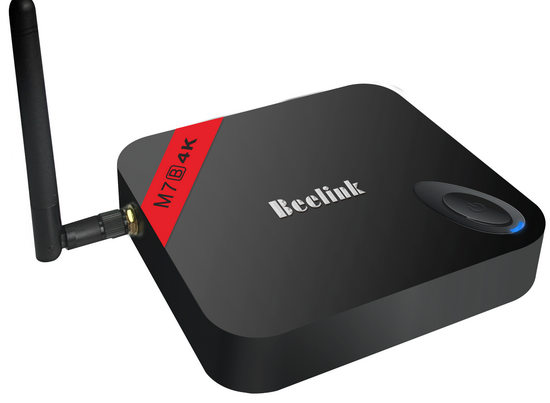
Download Android stock firmware for Beelink M7B TV Box


Download Android stock firmware for Beelink M7B TV Box from here, here or from here.You can download the firmware for M7B 1G/8G model from here.

 
Firmware:M7B_108k4_beelink.rar  
Archive file size: 361 MB
Model:M7B 2G/8G  
base:M7B_107k4
Date:2014.08.02
Platform: Amlogic S802B
Image file name: M7B_108k4_beelink.img


What's new:
1.Add 1080P24Hz support;
2.Support for NTFS/CIFS; --Offered by wasser
3.Change Input method to Latin,and remote can use;
4.Update Play Store;
5.Support for Mele F10 air-mouse; --Pulled from Bob's FW
6.Support for Xbox/PS3; --Offered by Bob
7.Change method of Root access; --Offered by leolas
8.Add kill-recent-task function; --Offered by daemonium
9.Update xbmc to Gotham 13.1,fix 4k playback and 2160P/720P HDMI display issue; --THX stane
10.Add remote function in Recovery Mode;--THX leolas
11.Adjust MBXLauncher,add Yahoo wether and Clean-Memory function,fix slow animation issue;
12.Fix issue->Power-key of Remote might lead to reboot;
13.Improve small probable of blurred screen 


Download Nexus Root Toolkit 1.8.6


First of all just download Nexus Root Toolkit 1.8.6 from here, here or here. You can downlod previous version Nexus Root Toolkit 1.8.5 from here.


Unlocking, rooting, relocking and unrooting simplified! (and much more!)


VERSION 1.8.5  - This program will automatically bring together all the files you need to unlock and root your device in a few clicks, or flash it back to stock and re-lock it. You can also use this program to backup/restore all your important data, flash zips, set file permissions, push and pull files, install apps, generate logcats/bugreports, and much more! With the included file association options, you can perform tasks like flashing zips, installing apps, restoring android backup files, and flashing/booting img files with just a double click! The program includes a full featured interface for automating tasks in TWRP, enhanced restore features, an in-built auto-updater/notification system, ‘any build’ mode, advanced restore features,’NRT- Live Log’ for viewing the adb/fastboot cmds that are run in the background, quick tools utilities, and tools for taking screenshots/screen-recordings.   All the latest Android builds and Nexus devices are officially supported including the new Nexus 5, with full KitKat support for all the newly upgraded devices.  The program intelligently and selectively downloads the files it needs for your device and makes sure you are using the latest files available.  The program can even auto-detect your device and build.  The main changes in this release are full 4.4.4 support, improvements to the updater, and general code enhancements and optimizations.


Supported Nexus devices:
· Galaxy Nexus: GSM Models (both yakju and non-yakju builds)
· Galaxy Nexus: CDMA/LTE Verizon Models
· Galaxy Nexus: CDMA/LTE Sprint Models
· Nexus S: Worldwide, i9020t and i9023 Models
· Nexus S: 850MHz, i9020a Models
· Nexus S: Korea, m200 Models
· Nexus S 4G: d720 Models
· Nexus 7: Asus Tablet
· Nexus 7 3G: Asus Tablet
· Nexus 7 v2 (2013): Asus Tablet
· Nexus 7 v2 (2013) LTE: Asus Tablet
· Nexus 10: Samsung Tablet
· Nexus 4: LG Phone
· Nexus 5: LG Phone

Instructions:
1. Select the correct device and build (what you are currently running)
2. Configure your drivers if you haven’t already using the driver guide (If you aren’t sure use Step 3 of the driver guide to test your drivers).
3. If you need to, backup your important data.
4. Unlock your device
5. Root your device
6. Enjoy! ^_^
  • Learn more about each option by mousing over the control, dynamic tooltips will provide you more information, also each button displays a message about what it does first.
  • So the best way to get familiar with the toolkit is simply to press the buttons and read what it says.
What’s new in Nexus Root Toolkit 1.8.6: August 6th, 2014
· Fixed linking to external websites from NRT’s main menu on Windows 8.1.
· Additional file dependency checks for the Lock script, to ensure it runs properly for N4 devices.
· Fixes to the custom driver installer to ensure it runs properly on machines that don’t have English set as the default language.
· New ‘Busybox’ option in the toolkits main settings menu for selecting whether or not the user wants to skip its installation during the root procedure, flash the free version (default), or install Busybox pro from the Playstore.
· Other small bug fixes and optimizations.

Download Android KitKat 4.4.2 stock firmware for Nagrace HPH NT-N3 TV Box


Download Android KitKat 4.4.2 stock firmware for Nagrace HPH NT-N3 TV Box  from here or from here.

 
Firmware: RK30SDK_RK3066_RK3066_4.4.2_V1.0.0_140619.rar
Model: HPH NT-N3
Image file size: 251 MB 

Wednesday, 6 August 2014

Download Android KitKat 4.4.2 stock firmware for Nagrace HPH NT-V3 TV Box


Download Android KitKat 4.4.2 stock firmware for Nagrace HPH NT-V3 TV Box  from here, here or from here.

 
Firmware: TRV3_RK3188_Android4.4.2_20140530
Model: HPH NT-V3
Image file size: 282 MB 

Doogee KissMe DG580 is coming with new technology


Doogee KissMe DG580 sales will debut on Aug 11th 2014.


Doogee DG580 Specs
CPU: MTK6582 1.3 GHz
Screen: 5.5" IPS qHD
RAM: 1GB
ROM: 8GB
OS: Android 4.4

Equipped with HotKnot
Thickness: 5.5 mm


Download Android KitKat 4.4.2 stock firmware for Nagrace HPH NT-V5 TV Box


Download Android KitKat 4.4.2 stock firmware for Nagrace HPH NT-V5 TV Box  from here or from here.

 
Firmware: TRV5_RK3188_Android4.4.2_20140530
Model: HPH NT-V5
Image file size: 282 MB 

Leagoo Lead 2, the new thinnest smartphone in the world


As you probably know Gionee Elife S5.5 was considered the thinnest smartphone in the world (5,5 mm). Till now, because new devices took the crown - Leagoo Lead Smartphone Line, like this new model Leagoo Lead 2 (5 mm).

Leagoo Lead 2, Leap Once Again
5-inch, more perfect proportion, Top Technology Collective Here
With perfect shape in 5-inch, one-handed size and just enough screen view, unusual, tough and light housing material, it makes everything totally natural.

Slim
5mm, slim beyond expectation
Exquisite industrial design, beyond the limits.
Brand new Lead 2 owns much more exquisite body, which is only 5mm metal frame built up from unbelievable scientific and technological achievements. Thinner phone, greater experience!

Technology
Focus on process, strive for details
Never give up striving for excellence.
With excellent all-in-one aluminum frame and perfect surface, it brings you outstanding appearance and tactile impression. That’s the miracle you will realize inadvertently from it.

Screen
Let the dream comes true.
All will show like crystal
With 5 inch perfect size, 960 * 540 resolution and 267PPI, the most realistic colors will be restored. Either recalling photos, watching movies, even playing large-scale 3D games, you will enjoy the most shocking experience.

Rear camera
What you see is what you get, great makes much more great.
Touched by exquisite detail.
Brand new 13MP Sony camera with double color temperature flash lights, condenses what you see into unique pictures. All photos will be presented like happening just now while you look back each of them. Your memory is worthy of such record.

Front camera
Focused on the better one of you
Built with 5.0MP front camera, recording your best moments, let you love yourself more on photos.

CPU
Response faster any time
Unique super-fast quad core processor
With brand new MTK6582 quad core 1.3Ghz CPU, which has built in Cortex A7 framework, the processing rate is 30% speed up than ever! While working with the new Android 4.4 OS, the phone runs with gratifying speed. That’s exactly powered by our Lead 1 engineer team, who has paid so much effort for our better experience!

Sound
Immersive feeling listening experience
High-fidelity sound cavity offers the most enjoyable visual and aural experience.
It almost restores the true voice. The excellent sound effects can bring you different immersive feeling experience while playing games or watching movies, even produce the feeling of going straightly into your heart.


Leagoo Lead 2 Specifications
Dimensions: 145.3*71.2*6.9mm(L×W×H)
Weight: 135g
CPU: 4*1.3Ghz Quad core Processor
Rear Camera: 13MP
Video Shooting: 720P HD 60Frame/s
Front Camera: 5MP
Flash light: Support
Display Size: 5.0"
Display Quality: IPS LCD
Technology: 5 Points  capacitive Multi-touch
PPI: 267
Resolution: 960*540 QHD
SIM: WCDMA/GSM Dual SIM dual standby
Frequency: WCDMA 850/1900/2100 & GSM850/900/1800/1900
GPS: Support
Bluetooth: Support
WIFI: Support
Battery Capacity: 2200mAh
Music: MP3, wav, wma, ogg, ape, flac, aac
Video: H.264/263,MPEG4,VP8, MVC
Photo: JPEG, PNG, GIF, BMP
Internal Memory: ROM 8GB
External Memory: Micro SD card ( T-FLASH card), max 32GB
RAM: 1 GB
Motion Sensor: Support
G-Sensor: Support


More details you'll find on Leagoo Facebook Fan Page.

Download Android stock firmware for Beelink M7B TV Box


Download Android stock firmware for Beelink M7B TV Box from here or from here.You can download the firmware for M7B 2G/8G model from here.

 
Firmware:M7B_108k4_1gddr_rtl8188  
Model:M7B 1G/8G  
base:M7B_107k4_1gddr_rtl8188
Date:2014.08.02
Platform: Amlogic S802B
Image file name: M7B_108k4_1gddr_rtl8188_beelink.img
Image file size: 614 MB 

What's new:
1.Add 1080P24Hz support;
2.Support for NTFS/CIFS; --Offered by wasser
3.Change Input method to Latin,and remote can use;
4.Update Play Store;
5.Support for Mele F10 air-mouse; --Pulled from Bob's FW
6.Support for Xbox/PS3; --Offered by Bob
7.Change method of Root access; --Offered by leolas
8.Add kill-recent-task function; --Offered by daemonium
9.Update xbmc to Gotham 13.1,fix 4k playback and 2160P/720P HDMI display issue; --THX stane
10.Add remote function in Recovery Mode;--THX leolas
11.Adjust MBXLauncher,add Yahoo wether and Clean-Memory function,fix slow animation issue;
12.Fix issue->Power-key of Remote might lead to reboot;
13.Improve small probable of blurred screen 


Tuesday, 5 August 2014

Ugoos S85 - Amlogic S805 Quad Core TV Dongle is coming!


Ugoos Industrial will unveil a new Android TV dongle which features quad core Amlogic S805 Cortex-A5 1.5GHz chipset and Android 4.4 OS.

Good news! We are glad to inform you that our new model S85 Android TV Dongle will hit the market soon. It features the latest Amlogic S805 quad core chipset, quad-core Mali-450 GPU, 1GB DDR3 RAM, 8GB Nand Flash and Android 4.4 operating system. This high performance smart TV dongle also supports H.265 video decoding and HDMI 1.4b.


S805 TV Dongle Specifications
Operation System: Android 4.4     
Chipset: Amlogic S805 Quad-Core Cortex-A5@1.5GHz     
GPU: Quad-Core Mali-450@600MHz+     
SDRAM: DDR3 1GB     
Nand Flash: 8GB NAND FLASH     
Power Supply: DC 5V/2A     
3D: Hardware 3D graphics acceleration      
Support Decoder Format: HD MPEG1/2/4,H.265, HD AVC/VC-1,RM/RMVB,Xvid/DivX3/4/5/6 ,RealVideo8/9/10     
Support Media Format: Avi/Rm/Rmvb/Ts/Vob/Mkv/Mov/ISO/wmv/asf/flv/dat/mpg/mpeg
Support Music Format: MP3/WMA/AAC/WAV/OGG/AC3/DDP/TrueHD/DTS/DTS/HD/FLAC/APE
Support Photo Format: HD JPEG/BMP/GIF/PNG/TIFF      
USB host: 1x High speed USB 2.0,support U DISK and USB HDD 
Card reader: SD/SDHC/MMC cards     
HDD file system: FAT16/FAT32/NTFS     
Support Subtitle: SRT/SMI/SUB/SSA/IDX+USB     
High Definition video output: SD/HD max.1920x1080 pixel      
OSD type of languages: English/French/German/Spanish/Italian/ etc multilateral languages     
Wireless: Built in WiFi     
Mouse/ Keyboard: Support mouse and keyboard via USB; Support 2.4GHz wireless mouse and keyboard via 2.4GHz USB dongle
HDMI: HDMI 1.4b with CEC     
Network Function: Skype chatting, Picasa,Youtube,Flicker,  Facebook, Online movies,etc
Other features: Free Internet searching,thousands of android applications,many kinds of games,etc.

Monday, 4 August 2014

How To Get Root On Acer Iconia A1-810 Running Kitkat 4.4.2


1. If you dind't update to KitKat is just perfect. Downgrade To Jellybean If Already Upgraded To Kitkat via various possible methods (Factory Reset Recommended). You'll find here Jelly Bean firmwares.
2. Make Sure You are not On Root, If Your Device is Already Rooted Make Sure You Unroot it Before Proceeding to the Next Step.
3. Go to Setting, in 'Software Update'. Check For Updates. Download The Latest Kitkat Update.
4. Now Wait For the Download To Complete Once The Download Is Completed Don't Click "Reboot And Update" Instead Let It Rest In The Notification Drawer.
5. Root Your Acer Iconia A1-810.
6. After Successfully Rooting Your Device Reboot Your Device.
7. Now Download OTA RootKeeper from Playstore.
8. Open The App Click Temp Un-Root. Reboot Device
9. From the Notification Drawer Choose "Restart And Update", wait for the update to complete.
10.  Open 'Root Keeper' and click 'Restore Root'.
11. Reboot your device a last time and Booom! Your tab is running Kitkat 4.4.2 and
it is rooted.


tutorial made by Calingo Flanc

How to Rewrite or Repair IMEI on Android Phones and Tablets

In this post you can find how to rewrite or repair your IMEI number on your android device (phone or tablet). In some cases when your android device got bricked, after repairing it  you might face issues with SIM network because of invalid IMEI on your android. There are many  reasons behind it.  In order to fix this issue you can read the below guide to repair imei on android.
NOTE: This guide is only to repair your android phone using your already existed imei number which you got along with phone, but not to change it. Changing imei is illegal and we don’t support that. 


Rewrite / Repair IMEI on Android
In order to do this, your phone must be rooted already. You are going to do this through Engineering mode in your android device. You can use the below secret code in engineering mode to rewrite old IMEI on your android.

1. Enter this code in your android dialler - *#7465625# or * # * # 3646633 # * # *
2. Now you have to tap on callpad or connectivity or slide the screen.
3. Now find CDS information option. CDS stands for Common data service.
4. Once you found it, you’ll see Radio Information option there, just tap on it.
5. If your phone is single sim, then you’ll see one option there, and dual sim users will see 2 options there like Phone 1, Phone 2.
6. Write your IMEI code there like in this format : “AT +EGMR=1,7,”your imei code here” and “AT +EGMR=1,10,”your imei code here” . Example: “AT =EGMR=1,7”9000XXXXXXXXXXXX”  After that tap on send command button. That’s it.

Download Eweat EW802 Android KitKat 4.4 stock firmware


Download Eweat EW802 Android KitKat 4.4 stock firmware  from here or from here.


Archive name: eweat_ew802_20140728
Archive file size: 365 MB
Build: k200-user 4.4.2 KOT49H 20140726 test-keys

Platform: Amlogic

Download ZOPO ZP998 Android 4.4 Kitkat stock firmware


Download ZOPO ZP998 Android 4.4 Kitkat stock firmware here or from here.


Archive name: ZP998-20140704-100917Android 4.4
Archive file size: 365 MB
Project: vanzo92_cwet_kk

Platform: MT6592
Config_version: V1.1.2


Upgrading notes (see this video tutorial)
1 – Download & unpack FlashTools. Run Flash_tool.exe
2 – Unpack Rom in folder
3 – Select MT6582_Android_scatter.txt in folder on rom. And wait.
4 – Check Option->USB Model, click USB Model
     Choose Option->DA DownLoad All->Speed->High Speed, click High Speed
5 – Turn off your phone, remove the battery.
6 -"Press F9 (or hit Download button)"
7 – Connect your phone into the computer with USB data cable.
8 – The process will start and a red progress bar will appear after color purple, yellow.
9 – And green circles display.
10 – Boot your phone
11 – Restart
12 – Enjoy 

Download Android KitKat 4.4 for MINIX Neo X7 Mini TV Box


Download Android KitKat 4.4 for MINIX Neo X7 Mini TV Box from here or from here.

Archive name: X7mini_20140718_4.4_001.rar
Archive file size: 376 MB
Update file name: X7mini_20140718_4.4_001.img